← Software SUPERDAW /01 · Development Journal

Windows first · macOS next

SUPERDAW /01

Dev Journal

I use this as my backstage log: what’s in the source, what passed a test, and what still needs a real Windows session. I keep the wins and caveats together.

Portable source tests · Nov 20114 passed · 2 ignored
Windows x64 cross-build · Nov 20Passed
CLAP test effect · Nov 91 fixture passed

Quick reality check: The current source passed portable tests and a Windows-target build, but there are no fresh Windows screenshots or current-build device/UI tests yet. The gallery below is real, but it shows earlier candidates from Nov 3—not the Nov 20 source.

The big picture · quick feature map

The dream, the build, and what’s next

Ultimate goal · not current status

A proper studio tool—not a web toy.

My long-term goal is to keep SUPERDAW low-CPU and native in Rust/Win32, with no WebView, while preserving the full studio workflow and matching the supplied Figma. I’m aiming for dependable real-plug-in state round-trips, a macOS Audio Unit build, and Pro Tools PTX conversion. That’s the target, not what my current source has achieved.

Feature list: what’s here vs. what’s planned

Current source · not fully Windows-accepted

Already in my workshop

  • Audio and projects. I have supported PCM WAV import and transport in source, plus native .super v4 save and v3/v4 load with portable tests. Windows file dialogs and device output still need my acceptance.
  • Arrange and mix. I have an eight-bar audio timeline, Volume/Pan automation, track controls, routing, sends, up to eight auxiliary Returns, and Bounce paths in source. I still need a live test of the current Windows controls and audible output.
  • Browser and plug-ins. I have source paths for the Browser to list, search, and preview supported WAV files, plus VST3 and CLAP effect hosting. One small CLAP fixture passed in the Sandbox; that is not broad plug-in compatibility or Windows acceptance.
  • Recording and sharing. I have a WinMM input-recording path and a limited audio-only DAWproject adapter. I have not accepted physical recording or an owning-DAW round-trip.
Planned targets · not in the current build

Next things I want to make real

  • Audio Wrench. I want Audio Wrench to deliver context-aware pitch/timing fixes, key snapping, and low-artifact automatic take rebouncing and replacement.
  • A smarter sample library. I want to search by category, key, and original tempo; collect media automatically; make relinking clear and painless; and preview real audio that stops or switches cleanly when selection changes. The basic WAV preview path exists in my source; I still need to build out and accept the fuller library UX and current Windows behavior.
  • Fast hands-on controls. Lettered Return buses, direct automation editing with A, and grid choices including Triplets and Off are in the source. Section markers now have a data and save/reopen foundation, but native marker editing and keyboard/numpad MIDI controls remain to be built.
  • Broader tested support. I still need to implement and accept real Windows plug-in/state round-trips across the intended VST2/VST3/CLAP/AU/AAX workflows, a macOS AU build, and Pro Tools PTX conversion. I treat these as future targets, not current capabilities.

My current receipts: 112 portable tests passed, 2 were skipped, and a Windows-target cross-build passed on Nov 20; one CLAP test effect passed in the Sandbox on Nov 9. I do not count those results as proof of current-build Windows UI, hardware audio, or commercial plug-in compatibility.

Current source, in plain English

A closer look at the workshop

I’m building SuperDAW as a native Rust/Win32 desktop app, not a web mockup. Code for a feature is a good start—not proof that I’ve tried it on real Windows gear. I use the badges to separate those states.

Source + portable tests

Start a project and move audio around

I can add audio tracks, import supported PCM WAV files, play or stop the mix, return to the start, and save a native .super project. My current project format writes v4 and can load v3 projects.

I have Mix Bounce and source-track Freeze paths. I still need current-build Windows acceptance for the file dialogs and full audio workflow.

Current Windows UI retest needed

Arrange on an eight-bar timeline

I can work with audio clips on tracks and edit Volume and Pan automation; my layout also shows track insert modules.

My portable tests cover timeline geometry, hit-testing, and automation behavior. I have test evidence that point editing was accepted on an older Windows build; I have not rerun it in the expanded current layout.

Source + portable tests

Shape the mix

I can set track level and pan, mute or solo tracks, route them through buses, and use up to eight auxiliary Return channels with sends. I have implemented Return Bounce in the shared mixer paths.

I have portable tests for these controls and signal paths. I still need live acceptance of the current Mix UI, routing, sends, and audible Windows output.

Windows device preview not retested

Find and preview sounds

I have a native Browser that can list supported PCM WAV files from a chosen folder, search filenames, preview a selected sample through the real audio-output path, and add it to a track.

I have VST3 metadata scanning and CLAP factory discovery in plug-in discovery. I have not yet run the current Windows folder dialogs or sample audition.

CLAP fixture passed · Nov 9

Use audio-effect plug-ins

I have VST3 and CLAP effect-hosting paths in source. I ran one small CLAP fixture in the Sandbox; it passed discovery, audio processing, bypass, project-state save/restore, and offline Bounce checks.

That CLAP result covers one test effect, not broad third-party compatibility. I have not verified current Windows plug-in processing or state restoration. My Nov 3 Windows lifecycle smoke test passed on an earlier candidate only.

Capture still unaccepted

Record from an audio input

I have implemented a WinMM recording path to write device audio into a WAV take and place it on the selected track.

I have not accepted a physical input recording. My older device probe was open-only, did not run SuperDAW’s exact capture path, and recorded no audio.

Subset only

Save, reopen, and exchange projects

I embed supported WAV media in native .super projects. I also have a limited audio-only DAWproject import/export adapter for a narrow mapped subset.

I have not verified native Windows Save/Open dialogs or a round trip through an owning DAW. I do not silently convert unsupported MIDI, plug-in/device state, or many timeline features.

Not implemented

What this build can’t open yet

Ableton .als, Pro Tools .ptx, and other DAW-native session conversion are not implemented. VST2, AU, and AAX are not hosted; a generic Windows .dll is not a plug-in format.

macOS has no accepted app build yet; it follows the Windows-first roadmap.

Nightly log · Windows first

Section markers now persist; Windows acceptance stays open

I added a bounded section-marker model and .super save/load support, not marker controls

What still works in my source

The native Rust/Win32 prototype has the tested Arrange timeline slice, PCM/project paths, limited Mix routing/Returns, and now an ordered labeled marker model that saves and reloads in .super v4. This change does not add visible marker placement, rename, or delete controls.

Milestones tonight

Section markers can be added in the project model with unique non-negative bar positions and bounded printable labels. The .super reader accepts up to 256 ordered markers, and files without a markers array still load with an empty marker list.

Fresh checks

cargo fmt --all -- --check passed; cargo test --bin SuperDAWNative --offline passed 114 tests, with 2 ignored and 0 failures; and the Windows x64 GNU cross-build passed. The README now matches this test count.

Still unproven

I have not accepted the current Windows UI, file dialogs, physical input/output, or plug-in processing/state restore. THEENTERPRISE was online, but its local execution session did not initialize for this task, so I could not launch or interact with this build. The Nov 3 editor-lifecycle pass is historical evidence from another executable; this cross-build alone is not Windows runtime acceptance. macOS stays behind Windows.

Next concrete step

I need to restore the usable Windows execution session, launch the current build on THEENTERPRISE, and test Arrange, Browser, Mix, dialogs, and physical audio. I’ll start macOS only after Windows acceptance.
Nightly log · Windows first

Same engine, same gate: the checks stay green

No new source milestone or Windows acceptance since my last log

What still works in my source

The native Rust/Win32 source still has its tested Arrange navigation/editing slice, PCM/project support, and limited Mix routing/Return paths. The current portable suite exercises source logic; it does not certify the live Windows controls or sound.

Milestones since yesterday

None: I found no newer source changes or Windows acceptance evidence since Nov 18. No fresh UI, device-audio, or plug-in pass landed.

Fresh checks

cargo fmt --all -- --check passed; cargo test --bin SuperDAWNative passed 112 tests, with 2 ignored and 0 failures; and the Windows x64 GNU target cross-build passed. My README still reports 105 tests, behind tonight’s run.

What still needs real Windows

I have not accepted this source’s UI, native dialogs, physical playback/capture, or plug-in processing/state restore on a Windows device. Historical Nov 3 lifecycle evidence is for an older executable; a cross-build is not a runtime test. macOS remains second.

Next concrete step

I need to run the current Windows-target build on THEENTERPRISE, capture the native window, and exercise Arrange first; then I can work through Browser, Mix, dialogs, and real audio acceptance. Only after Windows is accepted do I move to macOS.

Nightly log · Windows first

No new feature landed; my green checks hold

The code and Windows-acceptance status are unchanged since my last log

What still works in my source

My native Rust/Win32 source still includes the tested, content-sized Arrange timeline—pan, zoom, fit, beyond-bar-8 clip moves, right-trim and delete—plus the limited PCM/project and Mix routing/Return paths. That is source and portable-test evidence, not a fresh Windows UI pass.

New milestones

None since Nov 17: I found no newer source changes or Windows acceptance records. No new feature or device-level pass to celebrate tonight.

Fresh checks

cargo fmt --all -- --check passed; cargo test --bin SuperDAWNative passed 112 tests, with 2 ignored and 0 failures; and the Windows x64 GNU cross-build passed. My README still lists 105 tests, so its count is behind tonight’s fresh run.

Still open

I still need to test the current UI, dialogs, physical playback/capture, and plug-in processing/state restore on Windows. The Nov 3 lifecycle result is from an older executable; a cross-build does not prove this source works on a Windows device. macOS remains queued behind Windows.

Next concrete step

I need a hands-on run of the current Windows build on THEENTERPRISE: capture the native UI, exercise Arrange first, then move to Browser, Mix, dialogs, and physical audio acceptance. I’ll keep macOS next, not parallel, until Windows is proven.

Nightly log · Windows first

Quiet night for code; the green checks hold

No new source or Windows acceptance milestone since my last log

What still works in my source

My native Rust/Win32 prototype still has the tested Arrange timeline slice—content-fit, pan/zoom, beyond-bar-8 clip move, right-trim and delete—alongside PCM/project, Mix routing and Return paths. The portable tests cover source behavior, not live Windows acceptance.

Milestones tonight

No new source-file changes or Windows acceptance records have appeared since my Nov 10 log. I’m keeping the milestone column honest: nothing new to claim tonight.

Fresh checks

cargo fmt --all -- --check passed, cargo test --bin SuperDAWNative passed 112 tests (2 ignored, 0 failed), and the Windows x64 GNU target cross-build passed. My README still says 105 tests, so that count needs updating; tonight’s live run is 112.

Still blocked on real Windows

I have no current-source Windows UI screenshot, device playback/capture, native-dialog round-trip, or plug-in processing/state-restore acceptance. The Nov 3 plug-in-editor lifecycle pass belongs to an older candidate; tonight’s cross-build is not a Windows launch or audio test.

Next concrete step

I need to launch the current candidate on THEENTERPRISE, capture its native UI, and test the Arrange gestures there; then I can move through Browser, Mix, dialogs and physical audio. macOS remains after Windows acceptance.

Nightly log · Windows first

A longer runway for Arrange

My portable checks are green; the new timeline slice still needs real Windows hands-on time

What works in my source

I have a native Rust/Win32 audio workspace with PCM WAV handling, native project save/load, Arrange and Mix paths, routing and Returns, plus source paths for WAV preview, recording, and a limited audio-only DAWproject exchange. These are bounded features, not a finished DAW.

New milestone · the timeline can stretch

I have an absolute-bar, content-sized timeline with horizontal pan, pointer-anchored zoom, and project-fit; clips can move past bar 8, be right-trimmed, or deleted. Track focus/centering and shared 1/16, Triplets, and Off snapping are also in the source. Portable tests cover these behaviors; I have not accepted the gestures in the current Windows UI.

Checks I ran tonight

cargo fmt --all -- --check passed; cargo test --bin SuperDAWNative passed 112 tests, with 2 ignored and 0 failures; and cargo build --target x86_64-pc-windows-gnu passed. The CLAP fixture pass is from Nov 9, not tonight.

What I still need to prove

This Windows cross-build was not launched on Windows. I have no fresh current-source UI screenshot or current-build Windows test of mouse/keyboard interaction, device playback/capture, native dialogs, or real plug-in processing/state restore. Nov 3 Windows lifecycle evidence belongs to an older candidate.

Next concrete step

I need to launch this candidate on THEENTERPRISE, capture the current native window, and walk the expanded Arrange controls on-device; then I can continue through Browser, Mix, dialogs, and real audio acceptance. macOS stays next in line, after Windows.

Nightly log · first entry

Verification snapshot

Current source checks passed; live Windows acceptance remains open

Source checks

cargo fmt -- --check passed. cargo test --offline --locked passed 85 tests, with 2 ignored and 0 failures.

Windows build artifact

I passed Windows x64 GNU target checking and an optimized release cross-build. I built this Windows executable from the Sandbox; I did not build or launch it natively on Windows.

SHA-256: bde58655fec9ab5ae8567bb23e7f8c65cce39a987ec1684459c1874c75db160a

Real CLAP fixture

I ran one dynamic-host integration test with the bundled effect, including state persistence/restore, bypass, and Bounce assertions. This does not establish compatibility with commercial plug-ins.

Windows runtime and screenshots

THEENTERPRISE appeared online, but I could not obtain an authorized device-control session. I therefore did not test the current-build UI, physical input/output, dialogs, or capture fresh screenshots tonight.

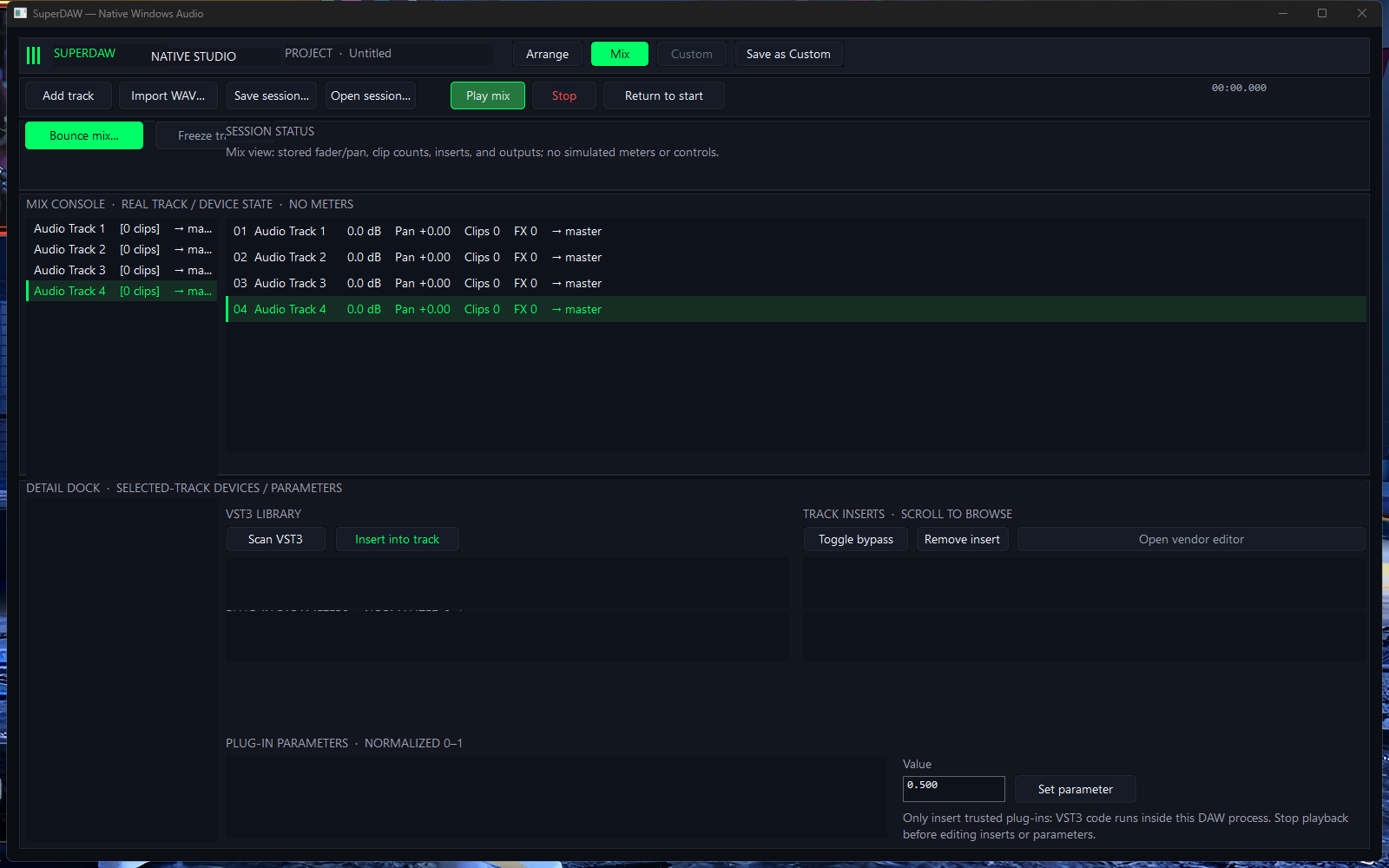
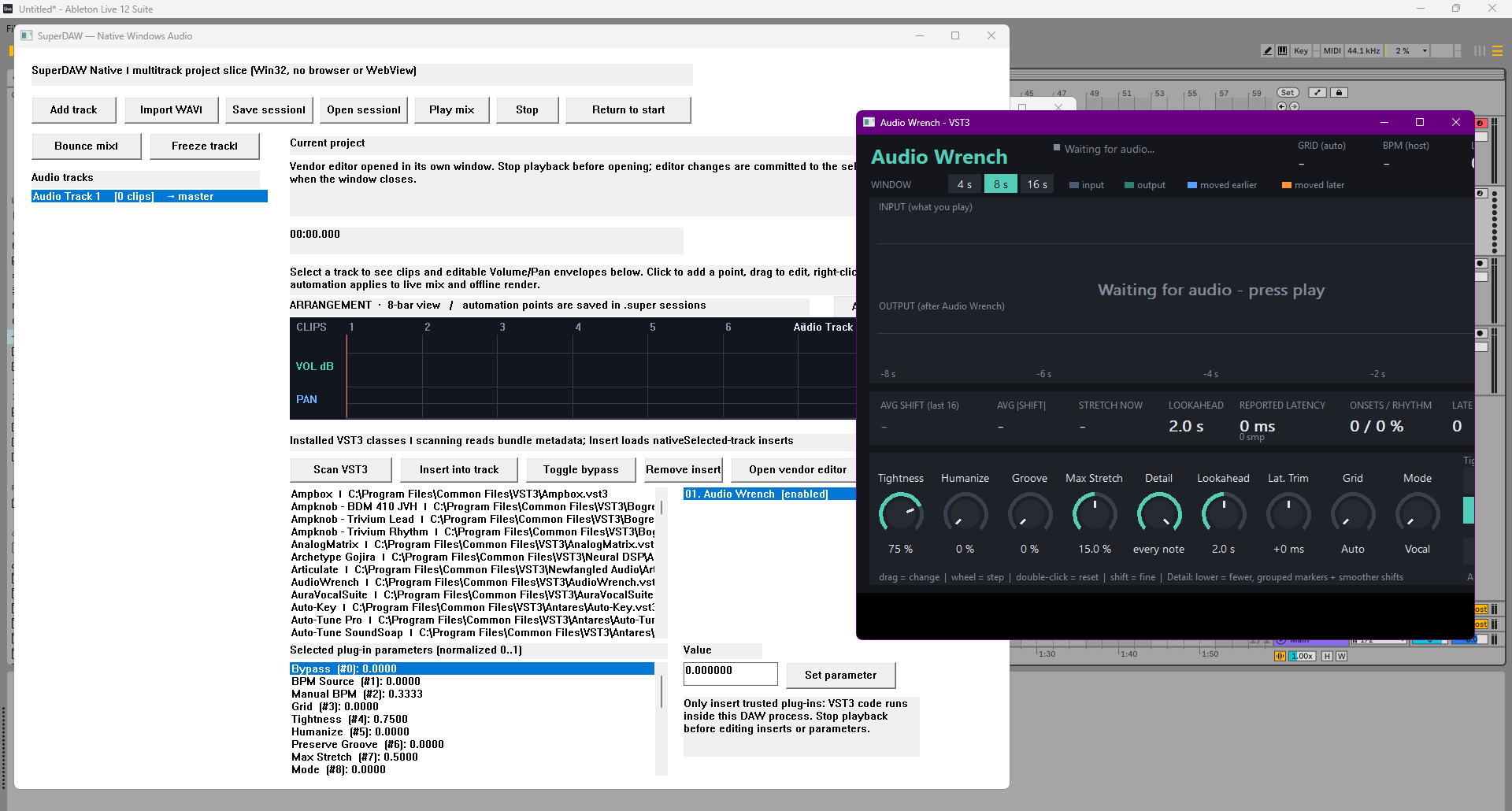
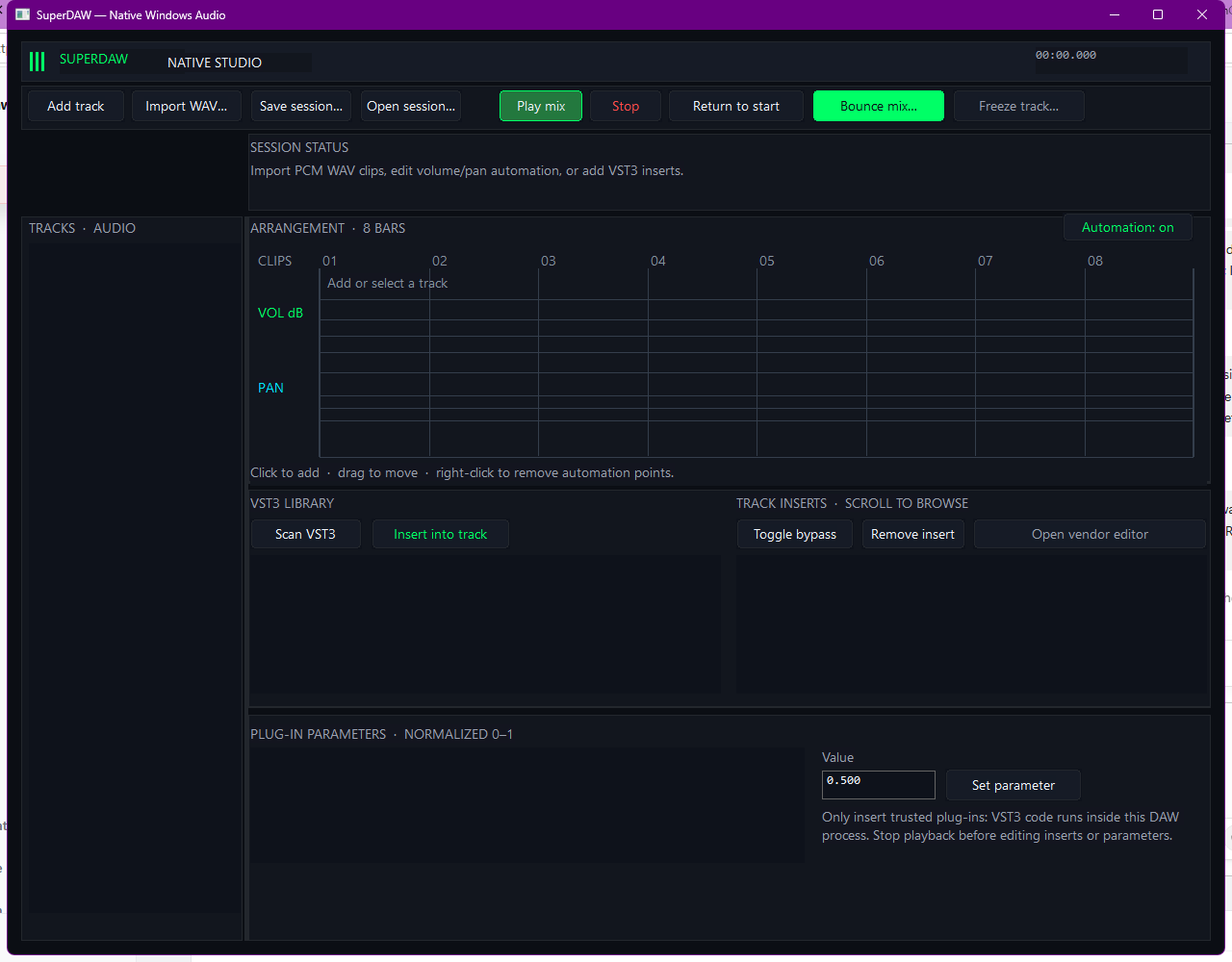
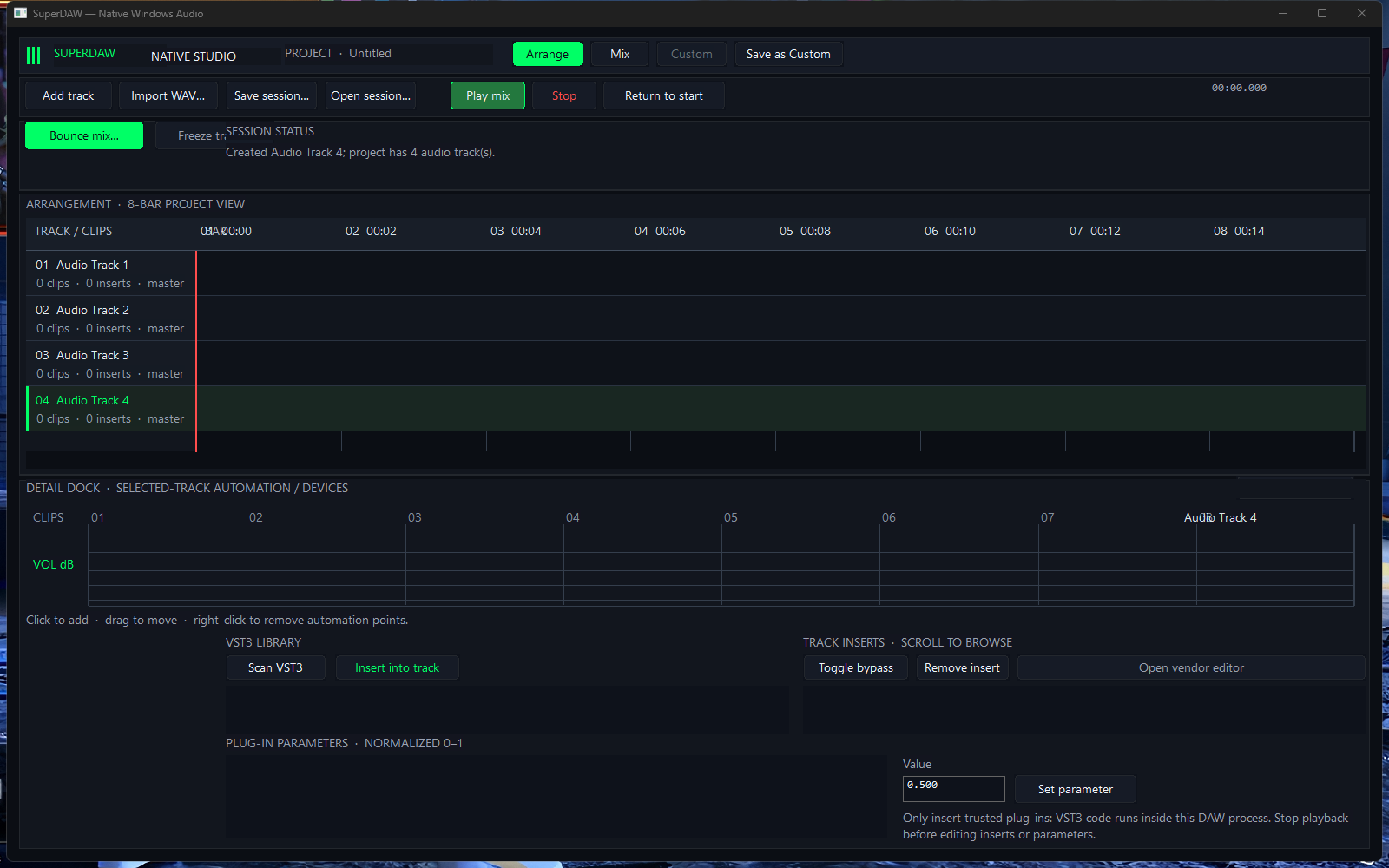
I keep historical evidence separate: Nov 3 records document a Windows plug-in-editor lifecycle smoke pass on a different candidate, plus earlier Arrange/Mix captures. I do not count those as acceptance of tonight’s binary.

Windows captures · Nov 3, 2026

Screenshots

I copied these screenshots from the local project records to show the native UI and plug-in window, and kept each date and evidence limit visible.

Next studio checks

What I need to try for real

Windows first

I need to capture the current-source UI on THEENTERPRISE and retest Arrange automation, Browser folder selection/sample preview, Mix controls, sends/returns, WAV import, and native .super Save/Open dialogs.

Audio + plug-ins

I need to test current-build device output and real input capture; verify Windows VST3/CLAP processing and state restore; then test Bounce/Freeze behavior with real effects.

Format boundaries

I will keep my claims limited to supported subsets. ALS/PTX and other session converters need implementation and owning-DAW round trips before I can mark them supported.

macOS after Windows

I plan to begin macOS app and AU work after practical Windows acceptance. I have no macOS build or runtime acceptance to report yet.

Evidence trail

What this entry is based on

I based this entry on fresh checks of the current native-windows-rust source formatting, portable tests, Windows x64 target check and release cross-build, plus the CLAP fixture script. I reviewed README.md, WINDOWS_NATIVE_UI_ACCEPTANCE_RESULTS.json, WINDOWS_LIFECYCLE_ACCEPTANCE_20261103.json, NATIVE_WINMM_RECORDING_PROBE_RESULTS_20261103.json, and FORMAT_SUPPORT_MATRIX.md. I kept this page local; I did not publish or deploy it. This page does not create a nightly update schedule.